6. Northbound API Specification
OVS 플랫폼은 정보 조회, 단말 관리, 통계를 위한 Northbound API를 제공합니다.
6.1. REST API
OVS는 다음과 같은 REST API를 제공합니다.
구분
|
설명
|
Method
|
URL
|
|---|---|---|---|
| Company | - 내 회사 정보 조회
- 회사 정보 조회
- 전체 단말 정보 조회
- 전체 단말 수 조회
|
GET
GET
GET
GET
|
/api/ovs/v1/company/info/me
/api/ovs/v1/company/info/{companyId}
/api/ovs/v1/company/info/devices/{companyId}
/api/ovs/v1/company/info/devices/cnt/{companyId}
|
| Device | - 단말 등록
- 단말 정보 조회
- 단말 삭제
|
POST
GET
DELETE
|
/api/ovs/v1/device
/api/ovs/v1/device/{serialNo}
/api/ovs/v1/device/{serialNo}
|
| Message | - 전체 단말에 메시지 전달
- 단말별 메시지 전달
|
POST
POST
|
/api/ovs/v1/message/company/{companyId}
/api/ovs/v1/message/device/{serialNo}
|
| Stats | - 특정 회사 단말의 기간별 이벤트 통계
- 특정 단말 기간별 이벤트 통계
|
GET
GET
|
/api/ovs/v1/statistics/company/event/{companyId}
/api/ovs/v1/statistics/device/event/{serialNo}
|
| Raw Data | - 기간별 이벤트 Raw Data
|
GET
|
/api/ovs/v1/statistics/event/raw
|
SK open API 포털의 gateway 연동시는 위의 API는 아래와 같이 사용되어야 합니다.
Method
|
URL example
|
|---|---|
GET
|
|
GET
|
|
GET
|
|
GET
|
|
POST
|
|
GET
|
|
DELETE
|
|
POST
|
|
POST
|
|
GET
|
|
GET
|
|
GET
|
6.2. Company 관리 API
회사 관련 정보 조회 API는 3종이 있습니다.
6.2.1. 내 회사 정보 조회
내가 속한 회사의 정보를 조회하는 API로, auth-token 만으로 조회가 가능합니다. auth token은 초기 company 생성시에 return 됩니다. SK open API 포탈에서 확인하실 수 있습니다.
| GET | /api/ovs/v1/company/info/me |
- Request Header
| option | Type | Default | Description |
|---|---|---|---|
| Content-Type | string | application/json | content type |
| X-Authorization | string | {{authToken}} | auth token |
- Request Body
| Key | Type | Description |
|---|---|---|
| N/A | N/A | N/A |
- Response fields
| Field | Description |
|---|---|
| id | ID of my company |
| name | service name |
| serviceType | service type |
| tokenPrefix | company prefix for serialNo and credentialsId |
- Example Code
Request
content-type:"application/json"
X-Authorization: "Bearer eyJhbGciOiJIUzUxMiJ9.eyJzdWIiOiJzeXNhZG1pbkB0aG…"
Request in curl format
auth token 만으로 내 회사 정보 조회.
curl --location --request GET 'https://apis.openapi.sk.com/api/ovs/v20/company/info/me' \
    --header 'Content-Type: application/json' \
    --header 'X-Authorization: Bearer eyJhbGciOiJIUzUxMiJ9.eyJzdWIiOiJuYml0ZXN0M0Bz....' \
    --header 'appKey: ***********************' \
    -d ''
Response (code: 200)
{
    "id": {
        "id": "f58ccd10-a0bd-11ea-a9b8-ff6a8104c32f"
    },
    "createdTime": 1590654831577,
    "name": "skoa_l7xx73e3323ea2124bd89d5ce708bcb26fd8",
    "serviceType": "skoa_l7xx73e3323ea2124bd89d5ce708bcb26fd8",
    "master": true,
    "masterId": {
        "id": "f58ccd10-a0bd-11ea-a9b8-ff6a8104c32f"
    },
    "picPasswd": null,
    "picName": "skoa_l7xx73e3323ea2124bd89d5ce708bcb26fd8",
    "picPhone": null,
    "picEmail": "l7xx73e3323ea2124bd89d5ce708bcb26fd8@skopenapi.com",
    "picDivision": null,
    "sktManagerName": null,
    "sktManagerEmail": null,
    "cooperationTask": null,
    "description": null,
    "notifyHost": null,
    "notifyMsgType": null,
    "notifyErrIdleMin": 0,
    "pwAccess": null,
    "dataAnalytics": null,
    "bcn": null,
    "tokenPrefix": "uio35",
    "ovs": true,
    "tokenExpr": -1
}
6.2.2. 회사 정보 조회
회사정보를 조회하기 위해서는 인증받은 auth token과 회사ID(companyId) 가 필요합니다. auth token은 SK open API 홈페이지에서, 회사ID(companyId)는 “내 회사 정보 조회” API로 확인할 수 있습니다.
- Request API URL
| GET | /api/ovs/v1/company/info/{companyId} |
- Request Header
| option | Type | Default | Description |
|---|---|---|---|
| Content-Type | string | application/json | content type |
| X-Authorization | string | {{authToken}} | auth token of each company |
- Request Body
| Key | Type | Description |
|---|---|---|
| N/A | N/A | N/A |
- Response fields
| Field | Description |
|---|---|
| id | ID of my company |
| name | service name |
| serviceType | service type |
| tokenPrefix | company prefix for serialNo and credentialsId |
(*) 위에 언급되지 않은 필드들은 추후 확장을 위해 구현되었으며, 사용에는 참조하지 않으셔도 됩니다.
- Example Code
Request
content-type:"application/json"
X-Authorization: "Bearer eyJhbGciOiJIUzUxMiJ9.eyJzdWIiOiJzeXNhZG1pbkB0aG…"
Request in curl format
CompanyId가 f58ccd10-a0bd-11ea-a9b8-ff6a8104c32f 인 경우.
curl --location --request GET 'https://apis.openapi.sk.com/api/ovs/v20/company/info/52631da0-b5ef-11ea-8f00-6730e8ef1a9e' \
    --header 'Content-Type: application/json' \
    --header 'X-Authorization: Bearer eyJhbGciOiJIUzUxMiJ9.eyJzdWIiOiJuYml0ZXN0M0Bz....' \
    --header 'appKey: ***********************' \
    -d ''
Response (code: 200)
{
    "id": {
        "id": "f58ccd10-a0bd-11ea-a9b8-ff6a8104c32f"
    },
    "createdTime": 1590654831577,
    "name": "skoa_l7xx73e3323ea2124bd89d5ce708bcb26fd8",
    "serviceType": "skoa_l7xx73e3323ea2124bd89d5ce708bcb26fd8",
    "master": true,
    "masterId": {
        "id": "f58ccd10-a0bd-11ea-a9b8-ff6a8104c32f"
    },
    "picPasswd": null,
    "picName": "skoa_l7xx73e3323ea2124bd89d5ce708bcb26fd8",
    "picPhone": null,
    "picEmail": "l7xx73e3323ea2124bd89d5ce708bcb26fd8@skopenapi.com",
    "picDivision": null,
    "sktManagerName": null,
    "sktManagerEmail": null,
    "cooperationTask": null,
    "description": null,
    "notifyHost": null,
    "notifyMsgType": null,
    "notifyErrIdleMin": 0,
    "pwAccess": null,
    "dataAnalytics": null,
    "bcn": null,
    "tokenPrefix": "uio35",
    "ovs": true,
    "tokenExpr": -1
}
6.2.3. 회사 전체 단말 리스트 조회
현재 회사에서 등록/관리하고 있는 전체 단말 정보를 조회하는 API 입니다. 단말관리 API를 통해서 회사에 등록된 단말의 정보를 확인하실 수 있습니다.
| GET | /api/ovs/v1/company/info/devices/{companyId}?limit=10 |
- Request Header
| option | Type | Default | Description |
|---|---|---|---|
| Content-Type | string | application/json | content type |
| X-Authorization | string | {{authToken}} | auth token |
- Request Body
| Key | Type | Description |
|---|---|---|
| N/A | N/A | N/A |
- Response fields
| Field | Type | Description |
|---|---|---|
| id | string | unique device id |
| companyId | string | unique company id |
| type | string | device type(OVC-G or OVC-M) |
| serialNo | string | device serialNo |
- Example Code
Request
content-type:"application/json"
X-Authorization: "Bearer eyJhbGciOiJIUzUxMiJ9.eyJzdWIiOiJzeXNhZG1pbkB0aG…"
Request in curl format
CompanyId가 f58ccd10-a0bd-11ea-a9b8-ff6a8104c32f 인 경우.
curl --location --request GET 'https://apis.openapi.sk.com/api/ovs/v20/company/info/devices/f58ccd10-a0bd-11ea-a9b8-ff6a8104c32f?limit=10' \
    --header 'Content-Type: application/json' \
    --header 'X-Authorization: Bearer eyJhbGciOiJIUzUxMiJ9.eyJzdWIiOiJzeXNhZG1pbkB0aG…' \
    --header 'appKey: ***********************' \
    -d ''
Response (code: 200)
{
    "data": [
        {
            "id": {
                "id": "ee874290-abba-11ea-b482-911940102f00"
            },
            "createdTime": 1591862994142,
            "companyId": {
                "id": "f58ccd10-a0bd-11ea-a9b8-ff6a8104c32f"
            },
            "vendor": "SKT1",
            "type": "OVC-G",
            "additionalInfo": null,
            "activationRequired": false,
            "serialNo": "uio35123451234512345",
            "credentialsId": null
        },
        {
            "id": {
                "id": "37c6b060-a0be-11ea-a9b8-ff6a8104c32f"
            },
            "createdTime": 1590654942693,
            "companyId": {
                "id": "f58ccd10-a0bd-11ea-a9b8-ff6a8104c32f"
            },
            "vendor": "SKT1",
            "type": "OVC-G",
            "additionalInfo": null,
            "activationRequired": false,
            "serialNo": "uio35fine1236",
            "credentialsId": null
        }
    ],
    "nextPageLink": null,
    "hasNext": false
}
6.2.4. 회사 전체 단말 수 조회
현재 회사에서 등록/관리하고 있는 전체 단말 수를 조회하는 API 입니다.
| GET | /api/ovs/v1/company/info/devices/cnt |
- Request Header
| option | Type | Default | Description |
|---|---|---|---|
| Content-Type | string | application/json | content type |
| X-Authorization | string | {{authToken}} | auth token |
- Request Body
| Key | Type | Description |
|---|---|---|
| N/A | N/A | N/A |
- Response fields
| Field | Type | Description |
|---|---|---|
| count | string | total number of registered devices |
- Example Code
Request
content-type:"application/json"
X-Authorization: "Bearer eyJhbGciOiJIUzUxMiJ9.eyJzdWIiOiJzeXNhZG1pbkB0aG…"
Request in curl format
CompanyId가 f58ccd10-a0bd-11ea-a9b8-ff6a8104c32f 인 경우.
curl --location --request GET 'https://apis.openapi.sk.com/api/ovs/v20/company/info/devices/cnt/f58ccd10-a0bd-11ea-a9b8-ff6a8104c32f' \
    --header 'Content-Type: application/json' \
    --header 'X-Authorization: Bearer eyJhbGciOiJIUzUxMiJ9.eyJzdWIiOiJzeXNhZG1pbkB0aG…' \
    --header 'appKey: ***********************' \
    -d ''
Response (code: 200)
7000
6.3. 단말 관리 API
6.3.1. 단말 등록
OVS 서비스를 이용할 신규 단말을 등록합니다.
| POST | /api/ovs/v1/device |
- Request Header
| option | Type | Default | Description |
|---|---|---|---|
| Content-Type | string | application/json | content type |
| X-Authorization | string | {{authToken}} | auth token |
- Request Body
| Key | Type | Description |
|---|---|---|
| vendor | string | company name |
| type | string | device type(OVC-G or OVC-M) |
| credentialsId | string | device credentails (5 digit company prefix + 15 digit credentails) |
| serialNo | string | device serialNo (5 digit company prefix + unique serial number) |
- Response Body
| Key | Type | Description |
|---|---|---|
| id | string | unique device ID |
| companyId | string | company ID |
| vendor | string | manufacture name of the device |
| credentialsId | string | device credentails (5 digit company prefix + 15 digit credentails) |
| serialNo | string | device serialNo (5 digit company prefix + unique serial number) |
| additionalInfo | string | any information of the device |
- Example Code
Request
content-type:"application/json"
X-Authorization: "Bearer eyJhbGciOiJIUzUxMiJ9.eyJzdWIiOiJzeXNhZG1pbkB0aG…"
{
    "vendor": "SKT",
    "type": "OVC-G",
    "credentialsId":"{{prefix}}123456789012345",
    "serialNo":"{{prefix}}12345678911234"
}
Request in curl format
curl --location --request POST 'https://apis.openapi.sk.com/api/ovs/v20/device' \
    --header 'Content-Type: application/json' \
    --header 'X-Authorization: Bearer eyJhbGciOiJIUzUxMiJ9.eyJzdWIiOiJzeXNhZG1pbkB0aG…' \
    --header 'appKey: ***********************' \
    --data-raw '{
        "vendor": "SKT",
        "type": "OVC-G",
        "credentialsId":"uio35123456789012345",
        "serialNo":"uio3512345678911234"
    }'
Response (code: 200)
{
    "id": {
        "id": "128fe3e0-ab98-11ea-b482-911940102f00"
    },
    "createdTime": 1591848022149,
    "companyId": {
        "id": "f58ccd10-a0bd-11ea-a9b8-ff6a8104c32f"
    },
    "vendor": "SKT",
    "type": "OVC-G",
    "additionalInfo": null,
    "activationRequired": false,
    "serialNo": "uio3512345678911234",
    "credentialsId": "uio35123456789012345"
}
6.3.2. 단말 정보 조회
단말 시리얼번호(serialNo)를 통해 단말 ID, 단말 형태 등 단말정보를 조회하는 API 입니다.
| GET | /api/ovs/v1/device/{serialNo} |
- Request Header
| option | Type | Default | Description |
|---|---|---|---|
| Content-Type | string | application/json | content type |
| X-Authorization | string | {{authToken}} | auth token |
- Request Body
| Key | Type | Description |
|---|---|---|
| N/A | N/A | N/A |
- Response fields
| Field | Description |
|---|---|
| id | unique device id |
| companyId | unique company id |
| type | device type(OVC-G or OVC-M) |
- Example Code
Request
content-type:"application/json"
X-Authorization: "Bearer eyJhbGciOiJIUzUxMiJ9.eyJzdWIiOiJzeXNhZG1pbkB0aG…"
Request in curl format
SerialNo가 uio3512345678911234 인 경우.
curl --location --request GET 'https://apis.openapi.sk.com/api/ovs/v20/device/uio3512345678911234' \
    --header 'Content-Type: application/json' \
    --header 'X-Authorization: Bearer eyJhbGciOiJIUzUxMiJ9.eyJzdWIiOiJzeXNhZG1pbkB0aG…' \
    --header 'appKey: ***********************' \
    -d ''
Response (code: 200)
{
    "id": {
        "id": "37c6b060-a0be-11ea-a9b8-ff6a8104c32f"
    },
    "createdTime": 1590654942693,
    "companyId": {
        "id": "f58ccd10-a0bd-11ea-a9b8-ff6a8104c32f"
    },
    "vendor": "SKT1",
    "type": "OVC-G",
    "additionalInfo": null,
    "activationRequired": false,
    "serialNo": "uio35fine1236",
    "credentialsId": null
}
6.3.3. 단말 삭제
등록된 단말을 삭제할 수 있습니다.
- Request Header
| option | Type | Default | Description |
|---|---|---|---|
| Content-Type | string | application/json | content type |
| X-Authorization | string | {{authToken}} | auth token |
- Request Body
| Key | Type | Description |
|---|---|---|
| N/A | N/A | N/A |
- Response Body
| Key | Type | Description |
|---|---|---|
| id | string | unique device ID |
| companyId | string | company ID |
| vendor | string | manufacture name of the device |
| credentialsId | string | device credentails (5 digit company prefix + 15 digit credentails) |
| serialNo | string | device serialNo (5 digit company prefix + unique serial number) |
| additionalInfo | string | any information of the device |
- Example Code
Request
content-type:"application/json"
X-Authorization: "Bearer eyJhbGciOiJIUzUxMiJ9.eyJzdWIiOiJzeXNhZG1pbkB0aG…"
Request in curl format
curl --location --request DELETE 'https://apis.openapi.sk.com/api/ovs/v20/device/uio3512345678911234' \
    --header 'Content-Type: application/json' \
    --header 'X-Authorization: Bearer eyJhbGciOiJIUzUxMiJ9.eyJzdWIiOiJzeXNhZG1pbkB0aG…' \
    --header 'appKey: ***********************' \
    --data-raw ''
Response (code: 200)
// response 200 OK only, no data body
6.4. Message Notification API
OVS는 특정 단말 또는 특정 회사 소속의 전체 단말에 Message 알림 기능을 제공합니다.
6.4.1. 전체 단말 메시지 전달
회사의 전체 단말에 공지 등의 메시지를 전달할 수 있습니다. 본 API에는 companyId가 필요하며, companyId는 /api/ovs/v1/company/me 에서 조회할 수 있습니다.
| POST | /api/ovs/v1/message/company/{companyId} |
- Request Header
| option | Type | Default | Description |
|---|---|---|---|
| Content-Type | string | application/json | content type |
| X-Authorization | string | {{authToken}} | auth token |
- Request Body
| Key | Type | Description |
|---|---|---|
| type | int | type of message (OTA, event ID et al.) |
| timestamp | int | linux epoch time in miliseconds |
| message | string | message contents |
- Response Body
| Key | Type | Description |
|---|---|---|
| type | int | type of message (OTA, event ID et al.) |
| timestamp | int | linux epoch time in miliseconds |
| message | string | message contents |
| serialNo | string | the list of devices which the message was delivered |
- Example Code
Request
content-type:"application/json"
X-Authorization: "Bearer eyJhbGciOiJIUzUxMiJ9.eyJzdWIiOiJzeXNhZG1pbkB0aG…"
{
    "type": 9999,
    "timestamp": 1590654942693,
    "message": "test message all"
}
Request in curl format
curl --location --request POST 'https://apis.openapi.sk.com/api/ovs/v20/messasge/company/f58ccd10-a0bd-11ea-a9b8-ff6a8104c32f' \
    --header 'Content-Type: application/json' \
    --header 'X-Authorization: Bearer eyJhbGciOiJIUzUxMiJ9.eyJzdWIiOiJzeXNhZG1pbkB0aG…' \
    --header 'appKey: ***********************' \
    --data-raw '{
        "type": 9999,
        "timestamp": 1590654942693,
        "message": "test message all"
    }
Response (code: 200)
{
    "message": {
        "type": 9999,
        "timestamp": 1590654942693,
        "message": "test message all"
    },
    "devices": [
        {
            "serialNo": "uio35fine1236"
        },
        {
            "serialNo": "uio35123451234512345"
        }
    ]
}
6.4.2. 단말별 메시지 전달
특정 단말에 공지 등의 메시지를 전달할 수 있습니다.
| POST | /api/ovs/v1/message/device/{serialNo} |
- Request Header
| option | Type | Default | Description |
|---|---|---|---|
| Content-Type | string | application/json | content type |
| X-Authorization | string | {{authToken}} | auth token |
- Request Body
| Key | Type | Description |
|---|---|---|
| type | int | type of message (OTA, event ID et al.) |
| timestamp | int | linux epoch time in miliseconds |
| message | string | message contents |
- Response Body
| Key | Type | Description |
|---|---|---|
| type | int | type of message (OTA, event ID et al.) |
| timestamp | int | linux epoch time in miliseconds |
| message | string | message contents |
| serialNo | string | the device which the message was delivered |
- Example Code
Request
content-type:"application/json"
X-Authorization: "Bearer eyJhbGciOiJIUzUxMiJ9.eyJzdWIiOiJzeXNhZG1pbkB0aG…"
{
    "type": 9999,
    "timestamp": 1590654942693,
    "message": "test message"
}
Request in curl format
curl --location --request POST 'https://apis.openapi.sk.com/api/ovs/v20/message/device/uio35fine1236' \
    --header 'Content-Type: application/json' \
    --header 'X-Authorization: Bearer eyJhbGciOiJIUzUxMiJ9.eyJzdWIiOiJzeXNhZG1pbkB0aG…' \
    --header 'appKey: ***********************' \
    --data-raw '{
        "type": 9999,
        "timestamp": 1590654942693,
        "message": "test message"
    }'
Response (code: 200)
{
    "message": {
        "type": 9999,
        "timestamp": 1590654942693,
        "message": "test message"
    },
    "serialNo": "uio35fine1236"
}
6.5. 이벤트 통계 API
OVS를 통해 전달했던 Event 통계 정보를 단말 또는 회사 별로 기간 조건을 두고 조회 할 수 있습니다.
6.5.1. 회사별 이벤트 통계
회사별 이벤트 통계를 조회할 수 있습니다. 본 API에는 companyId가 필요하며, companyId는 /api/ovs/v1/company/me 에서 조회할 수 있습니다.
| GET | /api/ovs/v1/statistics/company/event/{companyId} |
- Request Header
| option | Type | Default | Description |
|---|---|---|---|
| Content-Type | string | application/json | content type |
| X-Authorization | string | {{authToken}} | auth token |
- Request Body
| Key | Type | Default | Description |
|---|---|---|---|
| year | integer | Mandatory | 요청하고자 하는 특정 연도 |
| month | integer | Optional | 요청하고자 하는 특정월 |
| day | integer | Optional | 요청하고자 하는 특정일 |
- Response Body
| Key | Type | Description |
|---|---|---|
| companyId | String | company id |
| requestDate | String | JSON string of requested date |
| statistics | String | JSON string of event statistics |
- Example Code
Request
content-type:"application/json"
X-Authorization: "Bearer eyJhbGciOiJIUzUxMiJ9.eyJzdWIiOiJuYml0ZXN0M0Bz...."
Request in curl format
CompanyId가 52631da0-b5ef-11ea-8f00-6730e8ef1a9e 이고 2020년 7월 1일 통계를 요청한 경우.
curl --location --request GET 'https://apis.openapi.sk.com/api/ovs/v20/statistics/company/event/52631da0-b5ef-11ea-8f00-6730e8ef1a9e?year=2020&&month=7&day=1' \
    --header 'Content-Type: application/json' \
    --header 'X-Authorization: Bearer eyJhbGciOiJIUzUxMiJ9.eyJzdWIiOiJuYml0ZXN0M0Bz....' \
    --header 'appKey: ***********************' \
    -d ''
Response (code: 200)
{
    "companyId":"52631da0-b5ef-11ea-8f00-6730e8ef1a9e",
    "requestDate":{
        "year":2020,
        "month":7,
        "day":1
    },
    "statistics":{
        "event":{
            "msgNotification":16
        }
    }
}
6.5.2. 단말별 이벤트 통계
단말별 이벤트 통계를 조회할 수 있습니다. 본 API에는 단말의 serialNo가 필요합니다.
| GET | /api/ovs/v1/statistics/device/event/{serialNo} |
- Request Header
| option | Type | Default | Description |
|---|---|---|---|
| Content-Type | string | application/json | content type |
| X-Authorization | string | {{authToken}} | auth token |
- Request Body
| Key | Type | Default | Description |
|---|---|---|---|
| year | integer | Mandatory | 요청하고자 하는 특정 연도 |
| month | integer | Optional | 요청하고자 하는 특정월 |
| day | integer | Optional | 요청하고자 하는 특정일 |
- Response Body
| Key | Type | Description |
|---|---|---|
| serialNo | String | device serial No. |
| requestDate | String | JSON string of requested date |
| statistics | String | JSON string of event statistics |
- Example Code
Request
content-type:"application/json"
X-Authorization: "Bearer eyJhbGciOiJIUzUxMiJ9.eyJzdWIiOiJuYml0ZXN0MUB...."
Request in curl format
serialNo가 uio3512345678911234 2020년 7월 1일 통계를 요청한 경우.
curl --location --request GET 'https://apis.openapi.sk.com/api/ovs/v20/statistics/device/event/uio3512345678911234/event?year=2020&month=7&day=1' \
    --header 'Content-Type: application/json' \
    --header 'X-Authorization: Bearer eyJhbGciOiJIUzUxMiJ9.eyJzdWIiOiJuYml0ZXN0MUB....' \
    --header 'appKey: ***********************' \
    -d ''
Response (code: 200)
{
    "serialNo":"bjx84_ovs_server1",
    "requestDate":{
        "year":2020,
        "month":7,
        "day":1
    },
    "statistics":{
        "event":{
            "msgNotification":7
        }
    }
}
6.6. 이벤트 Raw Data API
OVS를 통해 전달했던 Event raw data를 월별로 조회할 수 있습니다.
6.6.1. 이벤트 Raw Data 정보 조회
월별 이벤트 Raw Data 정보를 조회할 수 있습니다. 조회결과로 1개월의 이벤트 raw data 파일
| GET | /api/ovs/v1/statistics/statistics/event/raw |
- Request Header
| option | Type | Default | Description |
|---|---|---|---|
| Content-Type | string | application/json | content type |
| X-Authorization | string | {{authToken}} | auth token |
- Request Body
| Key | Type | Default | Description |
|---|---|---|---|
| year | integer | Mandatory | 요청하고자 하는 특정 연도 |
| month | integer | Optional | 요청하고자 하는 특정월 |
- Response Body
| Key | Type | Description |
|---|---|---|
| url | string | URL of the raw data file(zip format) |
| zip_password | string | password for the raw data zip file |
| expiry | string | expiration date of the download URL |
- Example Code
Request
content-type:"application/json"
X-Authorization: "Bearer eyJhbGciOiJIUzUxMiJ9.eyJzdWIiOiJuYml0ZXN0MUB...."
Request in curl format
2021년 03월의 이벤트 raw data 정보를 조회하는 경우.
curl --location --request GET 'https://apis.openapi.sk.com/api/ovs/v20/statistics/event/raw?year=2021&month=3' \
    --header 'Content-Type: application/json' \
    --header 'X-Authorization: Bearer eyJhbGciOiJIUzUxMiJ9.eyJzdWIiOiJuYml0ZXN0MUB....' \
    --header 'appKey: ***********************' \
    -d ''
Response (code: 200)
{
    "url":"https://ovs.sktelecom.com:8082/repository/wioadlsl.zip",
    "zip_password":"abcd1234",
    "expiry":"2021-04-31"
}
6.6.2. 이벤트 Raw Data 파일 다운로드
위의 “이벤트 Raw Data 정보 조회” API를 통해서는 raw data URL만 얻을 수 있어, 해당 URL을 통해 raw data를 파일 서버로부터 다운로드 합니다. 파일은 zip 파일 형식이며, password는 “이벤트 Raw Data 정보 조회” API에서 URL과 함께 제공됩니다.
전체적인 절차는 아래와 같습니다.
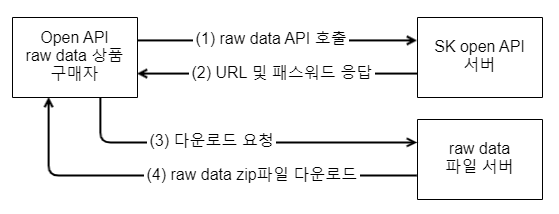
raw data 파일은 CSV 형식이며, 각 이벤트의 위도, 경도, 발생시각, 발생한 KS도로링크를 포함합니다.